
Toyota RAV4 (XA40) 2013-2018 Service Manual: Glossary of sae and toyota terms
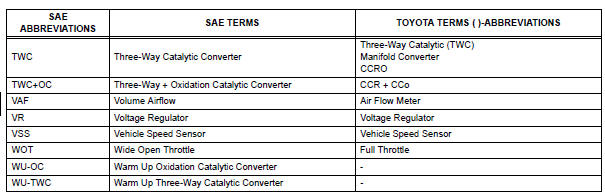
This glossary lists all sae-j1930 terms and abbreviations used in this manual in compliance with sae recommendations, as well as their toyota equivalents.



 Interior
...
Other materials:
Wireless charger (if
equipped)
A portable device can be
charged by just placing Qi standard
wireless charge compatible
portable devices according to
the Wireless Power Consortium,
such as smartphones and
mobile batteries, etc., on the
charge area.
This function cannot be used
with portable devices that are
larger than the chargi ...
Using the interior lights
Interior lights list
Interior lights
Interior/personal lights
Engine switch light (if equipped)
Cup holder light (if equipped)
Interior lights
Front
Off
Door position
The interior lights come on when
a door is opened. They turn off
when the doors are closed.
On
...
Air outlet damper control servo motor circuit
Description
The damper servo sends pulse signals to indicate the damper position to the
air conditioning amplifier.
The air conditioning amplifier activates the motor (normal or reverse) based on
these signals to move the
mode damper to the appropriate position, which controls the air o ...
