
Toyota RAV4 (XA50) 2019-2026 Owners Manual: Dynamic radar cruise control with full-speed range
In vehicle-to-vehicle distance control mode, the vehicle automatically accelerates, decelerates and stops to match the speed changes of the preceding vehicle even if the accelerator pedal is not depressed.
In constant speed control mode, the vehicle runs at a fixed speed.
Use the dynamic radar cruise control with full-speed range on freeways and highways.
- Vehicle-to-vehicle distance control mode
- Constant speed control mode
System Components
â– Meter display
- Vehicles with 7-inch multi-information display
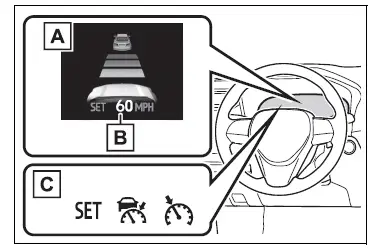
- Multi-information display
- Set speed
- Indicators
Vehicles with 12.3-inch multi-information display
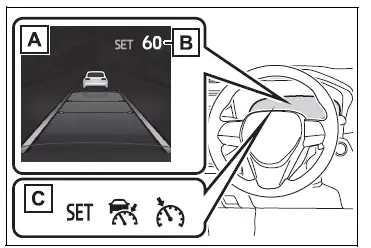
- Multi-information display
- Set speed
- Indicators
â– Operation switches
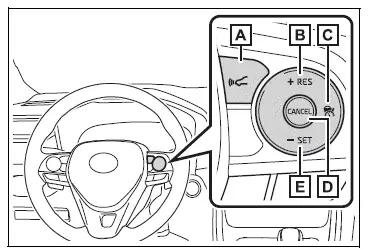
- Vehicle-to-vehicle distance switch
- "+RES" switch
- Cruise control main switch
- Cancel switch
- "-SET" switch
WARNING
â– Before using dynamic radar cruise control with full-speed range
- Driving safely is the sole responsibility of the driver. Do not rely solely on the system, and drive safely by always paying careful attention to your surroundings.
- The dynamic radar cruise control
with full-speed range provides
driving assistance to
reduce the driver's burden.
However, there are limitations to the assistance provided.
Read the following conditions carefully. Do not overly rely on this system and always drive carefully.
- When the sensor may not be correctly detecting the vehicle ahead
- Conditions under which the vehicle-to-vehicle distance control mode may not function correctly
- Set the speed appropriately depending on the speed limit, traffic flow, road conditions, weather conditions, etc. The driver is responsible for checking the set speed.
- Even when the system is functioning normally, the condition of the preceding vehicle as detected by the system may differ from the condition observed by the driver. Therefore, the driver must always remain alert, assess the danger of each situation and drive safely. Relying solely on this system or assuming the system ensures safety while driving can lead to an accident, resulting in death or serious injury.
- Switch the dynamic radar cruise control with full-speed range setting to off, using the cruise control main switch when not in use.
â– Cautions regarding the driving assist systems
Observe the following precautions, as there are limitations to the assistance provided by the system. Failure to do so may cause an accident resulting in death or serious injury.
- Assisting the driver to measure following distance
The dynamic radar cruise control with full-speed range is only intended to help the driver in determining the following distance between the driver's own vehicle and a designated vehicle traveling ahead. It is not a mechanism that allows careless or inattentive driving, and it is not a system that can assist the driver in low-visibility conditions.
It is still necessary for driver to pay close attention to the vehicle's surroundings.
- Assisting the driver to judge proper following distance
The dynamic radar cruise control with full-speed range determines whether the following distance between the driver's own vehicle and a designated vehicle traveling ahead is within a set range. It is not capable of making any other type of judgement. Therefore, it is absolutely necessary for the driver to remain vigilant and to determine whether or not there is a possibility of danger in any given situation.
- Assisting the driver to operate the vehicle
The dynamic radar cruise control with full-speed range does not include functions which will prevent or avoid collisions with vehicles ahead of your vehicle.
Therefore, if there is ever any possibility of danger, the driver must take immediate and direct control of the vehicle and act appropriately in order to ensure the safety of all involved.
â– Situations unsuitable for dynamic radar cruise control with full-speed range
Do not use dynamic radar cruise control with full-speed range in any of the following situations.
Doing so may result in inappropriate speed control and could cause an accident resulting in death or serious injury.
- Roads where there are pedestrians, cyclists, etc.
- In heavy traffic
- On roads with sharp bends
- On winding roads
- On slippery roads, such as those covered with rain, ice or snow
- On steep downhills, or where there are sudden changes between sharp up and down gradients
Vehicle speed may exceed the set speed when driving down a steep hill.
- At entrances to freeways and highways
- When weather conditions are bad enough that they may prevent the sensors from detecting correctly (fog, snow, sandstorm, heavy rain, etc.)
- When there is rain, snow, etc. on the front surface of the radar or front camera
- In traffic conditions that require frequent repeated acceleration and deceleration
- When your vehicle is towing a trailer or during emergency towing
- When an approach warning buzzer is heard often
 RSA (Road Sign Assist)
The RSA system recognizes
specific road signs using
the front camera to provide
information to the driver via
the display.
If the system judges that the
vehicle is being driven over
the speed limit, ...
 Driving in vehicle-to-vehicle distance control mode
This mode employs a radar to detect the presence of vehicles up to
approximately 328 ft. (100 m) ahead, determines the current vehicle-to-
vehicle following distance, and operates to maintain a suitab ...
Other materials:
Inspection
Inspect rear stabilizer link assembly lh
As shown in the illustration, move the ball joint stud
back and forth 5 times before installing the nut.
Using a torque wrench, turn the nut continuously at
a rate of 3 to 5 seconds per turn and take the torque
reading on the fifth turn.
...
Operating a usb memory
Connecting a usb memory enables you to enjoy music from the
vehicle speakers.
Connecting a usb memory
Open the cover and connect
a usb memory.
Turn on the power of the usb
memory if it is not turned on.
Press the “media� button repeatedly until “usb� is displayed.
Cont ...
List of storage features
Location of the storage features
Open tray
Auxiliary boxes
Bottle holders
Console box
Cup holders
Glove box
WARNING
â– Items that should not be left
in the vehicle
Do not leave glasses, lighters or
spray cans in the storage spaces,
as this may cause the following
when cabin temperature beco ...
