
Toyota RAV4 (XA40) 2013-2018 Service Manual: Disassembly
- Remove radiator grille sub-assembly
- Remove the 4 bolts and 4 nuts.
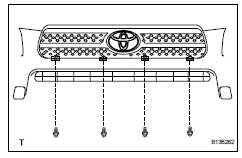
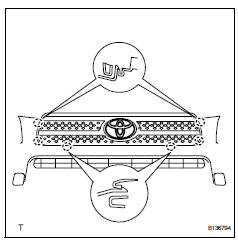
- Detach the 6 claws and remove the radiator grille.
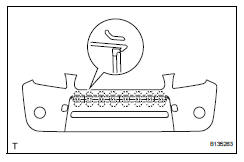
- Remove no. 1 Radiator grille lower
- Detach the 18 claws and remove the radiator grille.
- Remove no. 2 Radiator grille lower
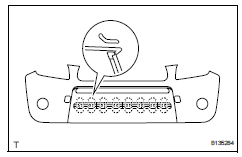
- Detach the 16 claws and remove the radiator grille.
- Remove front bumper arm hole cover lh
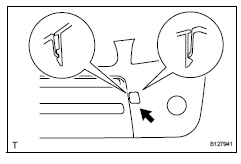
- Detach the 2 claws and disconnect the arm hole cover.
- Remove the hook and bumper arm hole cover.
- Remove front bumper arm hole cover rh
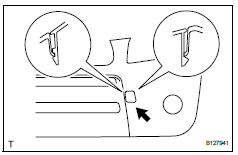
- Use the same procedures described for the lh side.
- Remove fog light assembly lh
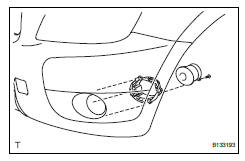
- Remove the screw and fog light.
- Remove the 3 bolts and fog light mounting bracket.
- Remove fog light assembly rh
Hint:
Use the same procedures described for the lh side.
- Remove front bumper hole cover lh (w/o fog light)
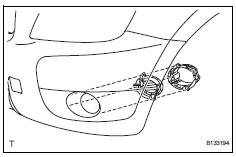
- Remove the 3 bolts, bumper hole cover and fog light mounting bracket.
- Remove front bumper hole cover rh (w/o fog light)
Hint:
Use the same procedures described for the lh side.
- Remove front bumper extension lh (for wide body)
- Detach the 7 outside moulding retainers and remove the extension lh.
Notice:
- If reusing the extension, take care not to damage the extension.
- Be careful not to damage the vehicle body.
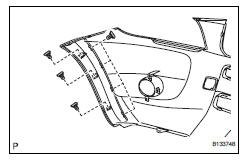
- Remove front bumper extension rh (for wide body)
Hint:
Use the same procedures described for the lh side.
 Removal
Disconnect cable from negative battery
terminal
Caution:
Wait at least 90 seconds after disconnecting the
cable from the negative (-) battery terminal to
prevent airbag and seat belt preten ...
 Reassembly
V
Attach the 7 outside moulding retainers to install the
extension.
Install front bumper extension rh (for wide
body)
Hint:
Use the same procedures described for the lh side ...
Other materials:
Problem symptoms table (2005/11-2006/01)
Hint:
Use the table below to help determine the cause of the
problem symptom. The potential causes of the symptoms are
listed in order of probability in the "suspected area" column of
the table. Check each symptom by checking the suspected
areas in the order they are listed. Replace p ...
Driver side satellite sensor bus initialization incomplete
Description
The side airbag sensor lh consists of part including the diagnostic circuit
and the lateral deceleration
sensor.
When the center airbag sensor receives signals from the lateral deceleration
sensor, it determines
whether or not the srs should be activated.
Dtc b1643/81 is ...
Replacement
Replace timing chain cover oil seal
Using a screwdriver and hammer, tap out the oil
seal.
Place the oil seal retainer on wooden blocks.
Apply multi-purpose grease to the lip of a new oil
seal.
Notice:
Keep the lip free of foreign objects.
Using sst and a hammer, tap in a ...
