
Toyota RAV4 (XA50) 2019-2026 Owners Manual: Front seats
The seats can be adjusted (longitudinally, vertically, etc.). Adjust the seat to ensure the correct driving posture.
Adjustment procedure
Manual seat
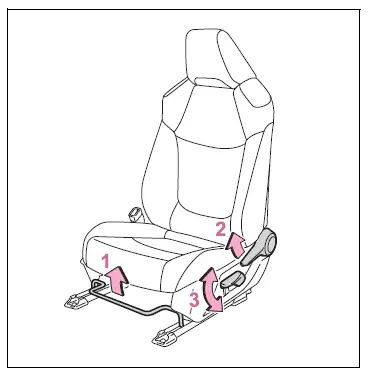
- Seat position adjustment lever
- Seatback angle adjustment lever
- Vertical height adjustment lever (driver's side only)
Power seat
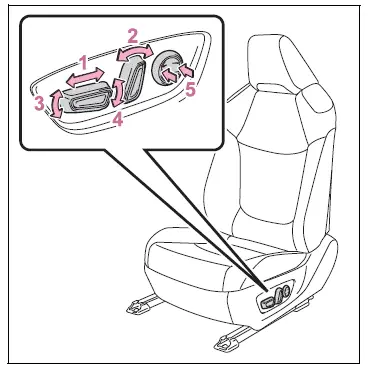
- Seat position adjustment switch
- Seatback angle adjustment switch
- Seat cushion (front) angle adjustment switch
- Vertical height adjustment switch
- Lumbar support adjustment switch (driver's side only)
â– When adjusting the seat
Take care when adjusting the seat so that the head restraint does not touch the ceiling and sun visor.
WARNING
â– When adjusting the seat position
- Take care when adjusting the seat position to ensure that other passengers are not injured by the moving seat.
- Do not put your hands under the
seat or near the moving parts to
avoid injury.
Fingers or hands may become jammed in the seat mechanism.
- Make sure to leave enough space around the feet so they do not get stuck.
- Manual seat only: After adjusting the seat, make sure that the seat is locked in position.
â– Seat adjustment
To reduce the risk of sliding under the lap belt during a collision, do not recline the seat more than necessary.
If the seat is too reclined, the lap belt may slide past the hips and apply restraint forces directly to the abdomen, or your neck may contact the shoulder belt, increasing the risk of death or serious injury in the event of an accident.
Adjustments should not be made while driving as the seat may unexpectedly move and cause the driver to lose control of the vehicle.

 Rear seats
Reclining adjustments and
folding the seatbacks can
be done with lever operation.
Adjustment procedure
Pull the seatback angle adjustment
lever A, and adjust the
seatback angle.
WARNING
â– When opera ...
Other materials:
Enabling/Disabling the
Parking Support Brake
The Parking Support Brake can
be enabled/disabled on the
screen of the multi-information
display. All of the Parking Support
Brake functions (static
objects and rear-crossing vehicles)
are enabled/disabled
simultaneously.
When the Parking Support Brake is
disabled, the PKSB OFF indicator
illuminat ...
Differential case
Components
Disassembly
Remove front differential ring gear
Place the matchmarks on the ring gear and
differential case.
Remove the 14 bolts.
Using a plastic-faced hammer, tap on the ring gear
to remove it from the case.
Remove front differential case ...
Throttle actuator control motor circuit
Description
The throttle actuator is operated by the ecm and opens and closes the
throttle valve using gears.
The opening angle of the throttle valve is detected by the throttle position (tp)
sensor, which is mounted
on the throttle body. The tp sensor provides feedback to the ecm. This ...
