
Toyota RAV4 (XA40) 2013-2018 Service Manual: Front passenger side seat belt warning light malfunction
Description
When the ignition switch is on, the center airbag sensor transmits front seat inner belt status signals to the combination meter through the can bus line. If the front passenger seat belt is not fastened, the heater control panel (automatic a/c) or clock (manual a/c) blinks the front passenger seat belt warning light. If the seat belt is fastened, the warning light goes off.
Notice:
The seat belt warning system uses the can bus line. Before troubleshooting the seat belt warning system, perform "communication function check" by following "how to proceed with troubleshooting" to confirm that the communication systems are normal.
Wiring diagram

Inspection procedure
- Perform active test by intelligent tester
- Select the active test, use the intelligent tester to generate a control command, and then check that the seat belt warning light operates.
Center airbag sensor:

Ok: passenger side seat belt warning light operates normally.


- Check a/c type
- Check system.



- Check heater control panel (power source circuit)

- Disconnect the e23 panel connector.
- Measure the voltage and resistance of the wire harness side connector.
Standard voltage 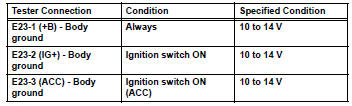
Standard resistance 


- Check wire harness (heater control panel - combination meter assembly)
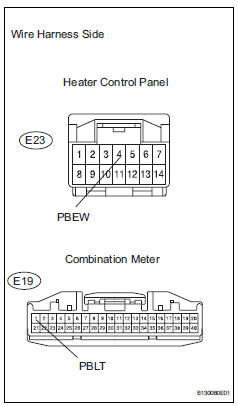
- Disconnect the e23 panel connector.
- Disconnect the e19 meter connector.
- Measure the resistance of the wire harness side connectors.
Standard resistance 


- Inspect heater control panel
- Remove the heater control panel.
- Apply battery voltage and check that the front passenger side seat belt warning light illuminates.
Ok 

Hint:
When the battery's negative (-) lead is applied to terminal 4 and the positive (+) lead is applied to terminal 7, the seat belt warning light does not illuminate.


- Check clock sub-assembly (power source circuit)

- Disconnect the e22 clock connector.
- Measure the voltage and resistance of the wire harness side connector.
Standard voltage
Standard resistance


- Check wire harness (clock - combination meter)

- Disconnect the e22 clock connector.
- Disconnect the e19 meter connector.
- Measure the resistance of the wire harness side connectors.
Standard resistance 


- Inspect clock sub-assembly

- Remove the clock.
- Apply battery voltage and check that the front passenger side seat belt warning light illuminates.
Ok 
Hint:
When the battery's negative (-) lead is applied to terminal 3 and the positive (+) lead is applied to terminal 5, the seat belt warning light does not illuminate.


Replace combination meter assembly
 Driver side seat belt warning light does not operate
Description
When the ignition switch is on, the center airbag sensor transmits front seat
inner belt status signals to
the combination meter through the can bus line. If the driver seat belt is no ...
 Front seat inner belt assembly
Components
...
Other materials:
Removal
(2006/01- )
Remove front wheel
Drain automatic transaxle fluid
Drain the automatic transaxle fluid for u140f (see
page ax-147).
Drain the automatic transaxle fluid for u241e (see
page ax-146).
Drain the automatic transaxle fluid for u151f (see
page ax-173).
Remove front axle hub nut ( ...
Compressor and pulley (for 2gr-fe)
Components
Removal
Discharge refrigerant from
refrigeration system (see page ac-172)
Disconnect cable from negative battery
terminal
Caution:
Wait at least 90 seconds after disconnecting the
cable from the negative (-) battery terminal to
prevent airbag and seat belt pretensione ...
If the electronic key does
not operate properly
(vehicles with a
smart key system)
If communication between the electronic key and vehicle is
interrupted („_p. 107) Or the electronic key cannot be used
because the battery is depleted, the smart key system and wireless
remote control cannot be used. In such cases, the doors
can be opened and the engine can be started by follo ...
