
Toyota RAV4 (XA50) 2019-2026 Owners Manual: Engine (ignition) switch (vehicles without smart key system)
Starting the engine
1. Pull the parking brake switch to check that the parking brake is set.
The parking brake indicator will come on.
2. Check that the shift lever is set in P.
3. Firmly depress the brake pedal.
4. Turn the engine switch to START to start the engine.
â– If the engine does not start
The engine immobilizer system may not have been deactivated. Contact your Toyota dealer.
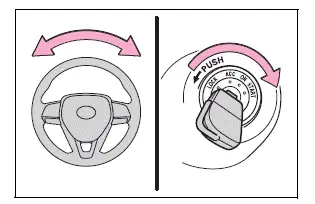
â– When the steering lock cannot be released
When starting the engine, the engine switch may seem stuck in OFF. To free it, turn the key while turning the steering wheel slightly left and right.
WARNING
â– When starting the engine
Always start the engine while sitting in the driver's seat. Do not depress the accelerator pedal while starting the engine under any circumstances.
Doing so may cause an accident resulting in death or serious injury.
NOTICE
â– When starting the engine
- Do not crank the engine for
more than 30 seconds at a time.
This may overheat the starter and wiring system.
- Do not race a cold engine.
- If the engine becomes difficult to start or stalls frequently, have your vehicle checked by your Toyota dealer immediately.
Changing the engine switch positions
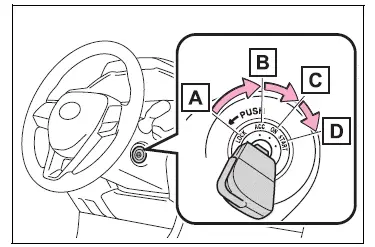
- OFF ("LOCK" position) The steering wheel is locked and the key can be removed. (The key can be removed only when the shift lever is in P.)
- ACC ("ACC" position) Some electrical components such as the audio system can be used.
- ON ("ON" position)
All electrical components can be used. - START ("START" position) For starting the engine.
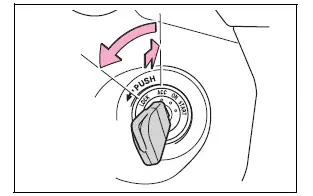
â– Turning the key from ACC to OFF
1. Shift the shift lever to P.
2. Push in the key and turn it to OFF.
â– Key reminder function
A buzzer sounds if the driver's door is opened while the engine switch is in OFF or ACC to remind you to remove the key.
WARNING
â– Caution when driving
Do not turn the engine switch to OFF while driving. If, in an emergency and you must turn the engine off while the vehicle is moving, turn the engine switch only to ACC to stop the engine.
An accident may result if the engine is stopped while driving.
NOTICE
â– To prevent battery discharge
Do not leave the engine switch in ACC or ON for long periods of time without the engine running.

 Engine (ignition) switch
(vehicles with smart key
system)
Engine (ignition) switch
(vehicles with smart key
system)
Performing the following
operations when carrying
the electronic key on your
person starts the engine or
changes engine switch
modes.
Starting the engine
1. Pull the parking brake switch
to check that ...
Other materials:
Rear no. 1 Suspension arm
Components
Removal
Hint:
Use the same procedures for the rh side and lh side.
The procedures listed below are for the lh side.
Remove rear wheel
Remove rear no. 1 Suspension arm assembly lh
Support the no. 2 Suspension arm lh.
Remove the bolt and 2 nuts from t ...
Disposal
Hint:
When scrapping vehicles equipped with a seat belt
pretensioner or disposing of a front seat outer belt (with seat
belt pretensioner), always first activate the seat belt
pretensioner in accordance with the procedures described
below. If any abnormality occurs during activation of the seat ...
Front seat assembly (for manual seat)
Components
...
