
Toyota RAV4 (XA50) 2019-2026 Owners Manual: Checking and adding the brake fluid
â– Checking fluid level
The brake fluid level should be between the "MAX" and "MIN" lines on the tank.
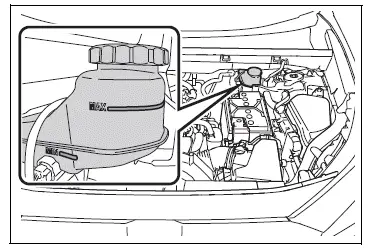
â– Adding fluid
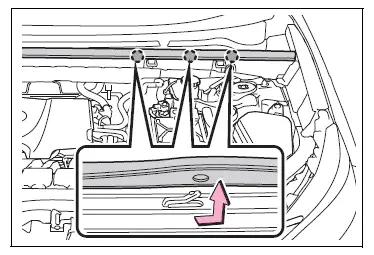
1. Slide and lift up the rubber strip to partly remove it as shown.
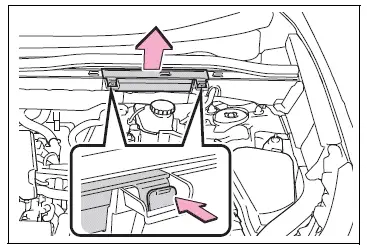
2. Disconnect the claws and remove the service cover.
3. Remove the reservoir cap.
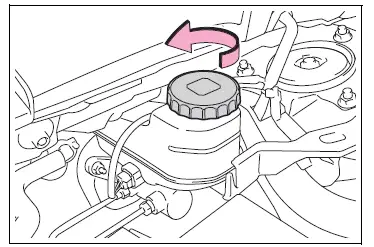
4. Add brake fluid slowly while checking the fluid level.
Make sure to check the fluid type and prepare the necessary item.
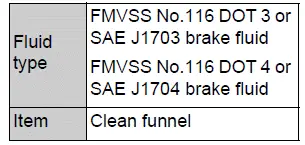
â– Brake fluid can absorb moisture from the air
Excess moisture in the brake fluid can cause a dangerous loss of braking efficiency. Use only newly opened brake fluid.
WARNING
â– When filling the reservoir
Take care as brake fluid can harm your hands and eyes and damage painted surfaces.
If fluid gets on your hands or in your eyes, flush the affected area with clean water immediately.
If you still experience discomfort, see a doctor.
NOTICE
â– If the fluid level is low or high
It is normal for the brake fluid level to go down slightly as the brake pads wear out or when the fluid level in the accumulator is high.
If the reservoir needs frequent refilling, there may be a serious problem.
 Checking the coolant
The coolant level is satisfactory
if it is between the "FULL" and
"LOW" lines on the reservoir
when the engine is cold.
Reservoir cap
"FULL" line
"LOW" line
If the level is on or below the "LOW" ...
 Checking the battery
Check the battery as follows.
â– Battery exterior
Make sure that the battery terminals
are not corroded and that
there are no loose connections,
cracks, or loose clamps.
Terminals
Hold-down clamp ...
Other materials:
How to proceed with troubleshooting
Hint:
Use the procedure to troubleshoot the power door lock
control system.
*: Use the intelligent tester.
Vehicle brought to workshop
Inspect battery voltage
Standard voltage:
11 to 14 v
If the voltage is below 11 v, recharge or replace the battery
before proceeding.
...
Before driving
Observe the following
before starting off in the
vehicle to ensure safety of
driving.
Installing floor mats
Use only floor mats designed
specifically for vehicles of the
same model and model year as
your vehicle. Fix them securely
in place onto the carpet.
1. Insert the retaining hooks
(clips) into ...
Refueling
Opening the fuel tank cap
Perform the following steps
to open the fuel tank cap:
Before refueling the vehicle
Close all the doors and windows,
and turn the engine
switch to OFF.
Confirm the type of fuel.
â– Fuel tank opening for unleaded
gasoline
To help prevent incorrect fueling,
your vehicle ...
