
Toyota RAV4 (XA50) 2019-2026 Owners Manual: Back door
The back door can be locked/unlocked and opened/closed by the following procedures.
WARNING
Observe the following precautions.
Failure to do so may result in death or serious injury.
â– Before driving
- Make sure that the back door is
fully closed.
If the back door is not fully closed, it may open unexpectedly while driving and hit nearby objects or luggage in the luggage compartment may be thrown out, causing an accident.
- Do not allow children to play in
the luggage compartment.
If a child is accidentally locked in the luggage compartment, they could get heat exhaustion or other injuries.
- Do not allow a child to open or
close the back door.
Doing so may cause the back door to operate unexpectedly, or cause the child's hands, head, or neck to be caught by the closing back door.
â– Important points while driving
- Keep the back door closed
while driving.
If the back door is left open, it may hit near-by objects or luggage in the luggage compartment may be thrown out, causing an accident.
- Never let anyone sit in the luggage
compartment.
In the event of sudden braking, sudden swerving or a collision, they are susceptible to death or serious injury.
â– Back door handles
Do not hang any object to the back door handles.
If any object is hung, the back door may suddenly shut, causing parts of the body to be caught, resulting in death or serious injury.
â– Operating the back door
Observe the following precautions.
Failure to do so may cause parts of the body to be caught, resulting in death or serious injury.
- Remove any heavy loads, such as snow and ice, from the back door before opening it. Failure to do so may cause the back door to suddenly shut again after it is opened.
- When opening or closing the back door, thoroughly check to make sure the surrounding area is safe.
- If anyone is in the vicinity, make sure they are safe and let them know that the back door is about to open or close.
- Use caution when opening or closing the back door in windy weather as it may move abruptly in strong wind.
- Vehicles without power back door: The back door may suddenly shut if it is not opened fully. It is more difficult to open or close the back door on an incline than on a level surface, so beware of the back door unexpectedly opening or closing by itself. Make sure that the back door is fully open and secure before using the luggage compartment.
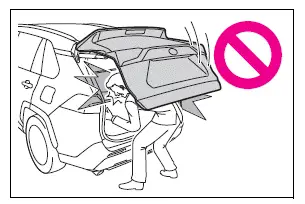
- Vehicles with power back door: The back door may suddenly shut if it is not opened fully, while on a steep incline. Make sure that the back door is secured before using the luggage compartment.
- When closing the back door, take extra care to prevent your fingers, etc. from being caught.
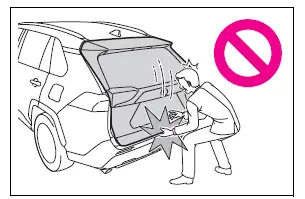
- Vehicles without power back door: When closing the back door, make sure to press it lightly on its outer surface. If the back door handle is used to fully close the back door, it may result in hands or arms being caught.
- Do not pull on the back door
damper stay (vehicles without
power back door) or
back door spindle (vehicles with
power back door) to
close the back door, and do not
hang on the back door damper
stay (vehicles without power
back door) or back door spindle
(vehicles with power back door).
Doing so may cause hands to be caught or the back door damper stay (vehicles without power back door) or back door spindle (vehicles with power back door) to break, causing an accident.
- Vehicles without power back door: If a bicycle carrier or similar heavy object is attached to the back door, it may suddenly shut again after being opened, causing someone's hands, head or neck to be caught and injured. When installing an accessory part to the back door, using a genuine Toyota part is recommended.
Unlocking and locking the back door from the outside
â– Using the entry function (vehicles with smart key system)
Carry the electronic key to enable this function.

- Unlocks all the doors The doors cannot be unlocked for 3 seconds after the doors are locked.
- Locks all the doors
Check that the door is securely locked.
â– Operation signals
A buzzer sounds and the emergency flashers flash to indicate that the doors have been locked/unlocked using the entry function (if equipped) or wireless remote control. (Locked: once; Unlocked: twice)
â– Security feature
Vehicles without smart key system
If a door is not opened within approximately 60 seconds after the vehicle is unlocked using the wireless remote control, the security feature automatically locks the vehicle again.
Vehicles with smart key system
If a door is not opened within approximately 60 seconds after the vehicle is unlocked using the entry function or wireless remote control, the security feature automatically locks the vehicle again. (However, depending on the location of the electronic key, the key may be detected as being in the vehicle. In this case, vehicle may be unlocked.)
 Side doors
The vehicle can be locked
and unlocked using the
entry function, wireless
remote control, door lock
switches, key or inside lock
buttons.
Unlocking and locking the
doors from the outside
â– Using the ...
 Opening/closing the back
door (vehicles without
power back door)
Opening/closing the back
door (vehicles without
power back door)
â– Open
Raise the back door while
pressing up the back door
opener switch.
â– Close
Lower the back door using the
back door handle A, and make
sure to push the back door
down from the outside to cl ...
Other materials:
Wheels
If a wheel is bent, cracked or
heavily corroded, it should
be replaced. Otherwise, the
tire may separate from the
wheel or cause a loss of
handling control.
Wheel selection
When replacing wheels, care
should be taken to ensure that
they are equivalent to those
removed in load capacity, diameter,
rim ...
Lost communication with front passenger side - side airbag sensor assembly
Description
The side airbag sensor rh consists of parts including the diagnostic circuit
and the lateral deceleration
sensor.
When the center airbag sensor receives signals from the lateral deceleration
sensor, it determines
whether or not the srs should be activated.
Dtc b1627/82 i ...
Internal control module random access memory (ram) error
Description
The ecm continuously monitors its own internal memory status, internal
circuits, and output signals
transmitted to the throttle actuator. This self-check ensures that the ecm is
functioning properly. If any
malfunction is detected, the ecm sets the appropriate dtc and illumina ...
