
Toyota RAV4 (XA40) 2013-2018 Service Manual: System check
Hint:
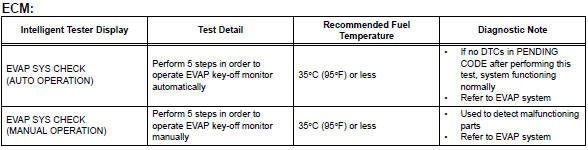
Performing a system check enables the system, which consists of multiple actuators, to be operated without removing any parts. In addition, it can show whether or not any dtcs are set, and can detect potential malfunctions in the system. The system check can be performed with the intelligent tester.
- Connect the intelligent tester to the dlc3.
- Turn the ignition switch on.
- Turn the tester on.
- Select the following menu items: diagnosis / enhanced obd ii / system check.
- Perform the system check by referring to the table below.
 Active test
Hint:
Performing an active test enables components
including the relays, vsv (vacuum switching valve) and
actuators, to be operated without removing any parts.
The active test can be performed w ...
 Diagnostic trouble code chart
Hint:
Parameters listed in the chart may be different than your
readings depending on the type of instrument and other
factors.
If any dtcs are displayed during a check mode dtc check,
check th ...
Other materials:
Parking brake assembly
Components
Disassembly
Hint:
Use the same procedures for the lh side and rh side.
The procedures listed below are for the lh side.
Remove rear wheel
Disconnect rear disc brake cylinder
mounting lh (see page br-55)
Remove parking brake shoe adjusting
hole plug
Remove t ...
Pressure control solenoid "b" electrical (shift solenoid valve sl2)
Description
Shifting from 1st to o/d is performed in combination with the on and off
operation of the shift solenoid
valves sl1 and sl2, which are controlled by the ecm. If an open or short circuit
occurs in any of the shift
solenoid valves, the ecm controls the remaining normal shift sol ...
Selecting the driving mode
The following modes can be selected to suit driving conditions.
Eco drive mode
Use eco drive mode to help achieve low fuel consumption during
trips that involve frequent accelerating.
Press the “eco mode� button
to select eco drive mode.
The “eco mode� indicator
comes on.
Press t ...
