
Toyota RAV4 (XA40) 2013-2018 Service Manual: Evaporative emission control system leak detected

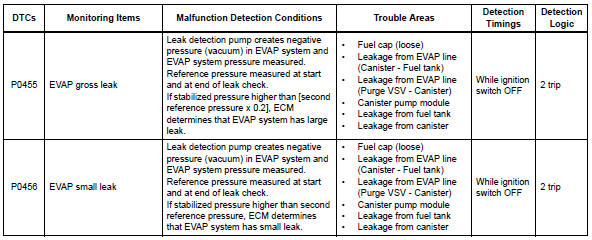
Dtc summary
Description
The description can be found in the evap (evaporative emission) system (see page es-335).
Inspection procedure
Refer to the evap system (see page es-340).
Monitor description
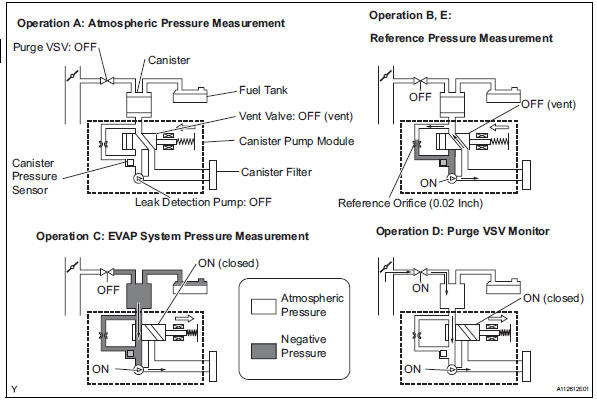
5 Hours* after the ignition switch is turned off, the leak detection pump creates negative pressure (vacuum) in the evap system. The ecm monitors for leaks and actuator malfunctions based on the evap pressure.
Hint:
*: If the engine coolant temperature is not below 35°c (95°f) 5 hours after the ignition switch is turned off, the monitor check starts 2 hours later. If it is still not below 35°c (95°f) 7 hours after the ignition switch is turned off, the monitor check starts 2.5 Hours later.
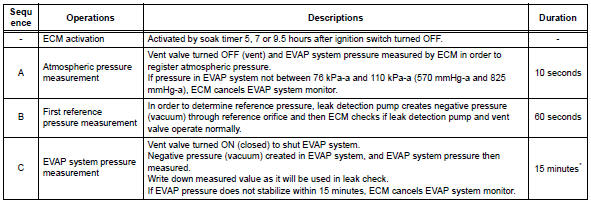
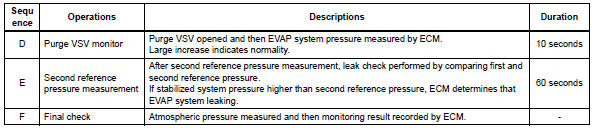
*: If only a small amount of fuel is in the fuel tank, it takes longer for the evap pressure to stabilize.
- P0455: evap gross leak
In operation c, the leak detection pump creates negative pressure (vacuum) in the evap system and the evap system pressure is measured. If the stabilized system pressure is higher than [second reference pressure x 0.2] (Near atmospheric pressure), the ecm determines that the evap system has a large leakage, illuminates the mil and sets the dtc (2 trip detection logic).
- P0456: evap very small leak
In operation c, the leak detection pump creates negative pressure (vacuum) in the evap system and the evap system pressure is measured. If the stabilized system pressure is higher than the second reference pressure, the ecm determines that the evap system has a small leakage, illuminates the mil and sets the dtc (2 trip detection logic).
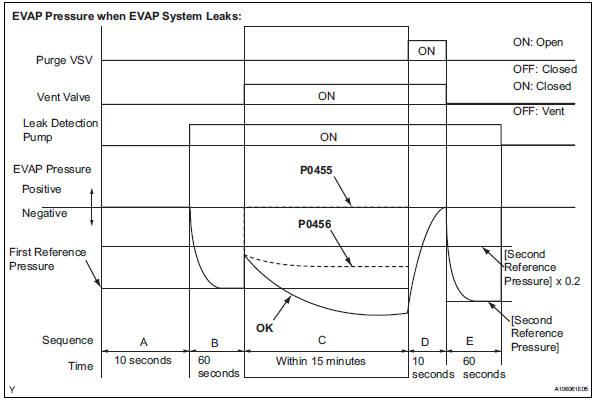
Monitor strategy

Typical enabling conditions
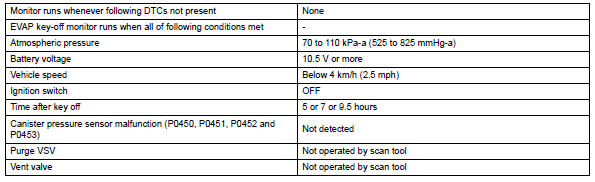

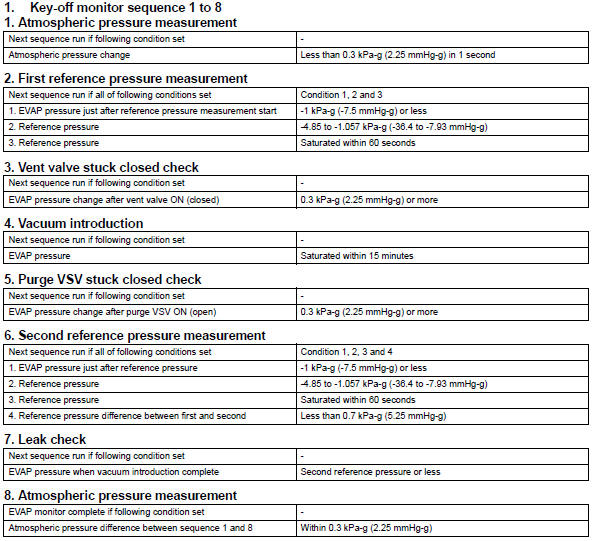
Typical malfunction thresholds

Monitor result
Refer to checking monitor status (see page es-17).
 Evaporative emission control system pressure sensor
Dtc summary
Hint:
The canister pressure sensor is built into the canister pump module.
Description
The description can be found in the evap (evaporative emission) system (see
page es ...
 Vehicle speed sensor "A"
description
The speed sensor detects the wheel speed and sends the appropriate signals to
the skid control ecu.
The skid control ecu converts these wheel speed signals into a 4-pulse signal ...
Other materials:
Yaw rate and deceleration sensor
Components
Removal
Disconnect cable from negative battery
terminal
Caution:
Wait at least 90 seconds after disconnecting the
cable from the negative (-) battery terminal to
prevent airbag and seat belt pretensioner activation.
Remove front seat assembly lh
For manual seat: ...
Removal
Hint:
Use the same procedures for the rh side and lh side.
The procedures listed below are for the lh side.
Remove roof rack support sub-assembly center
Remove the 4 roof carrier caps and roof rack
support center.
Remove roof rack bar front
Remove the 4 screws ...
Removal
Hint:
Use the same procedures for the rh side and lh side.
The procedures listed below are for the lh side.
Remove rear wheel
Remove rear stabilizer link assembly lh
Remove the nut and disconnect the link from the
suspension no. 2 Arm.
Remove the nut and link from the sta ...
